Verify Your Certificate in 3 Steps
Barcode Number
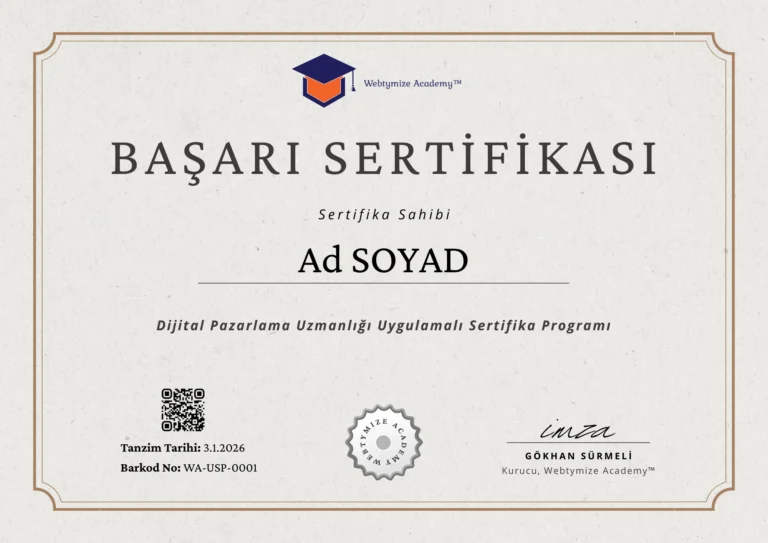
Please refer to the barcode number specifically assigned to your certificate, located in the bottom left corner of your digital certificate.
Interrogation Process
Enter this reference number in full into the certificate verification tool at the top of the page and click the ‘Verify’ button to initiate the database query.
Verification Result
As a result of the query, view the certificate holder's details, the completed programme details and the validity status of the document in detail.
The Digital Signature of Success: Webtymize Academy™
Webtymize Academy™ graduates validate their acquired expertise with a verifiable and permanent certificate of achievement.
Certificate of Achievement
Over 1,500 students who have shaped their professional journeys with Webtymize Academy™ certification programmes are successfully applying the skills they have acquired in the business world.
Insider Channel
Gain priority access to announcements, updates and important developments with the Webtymize Academy™ Insider Channel; get involved in registration processes early and don't miss out on Insider-exclusive benefits.
Frequently Asked Questions
We have compiled frequently asked questions to help you verify the authenticity of Webtymize Academy™ certificates, learn about the verification process, and understand the steps you should follow in case of technical issues.
The barcode number of your certificate is located in the bottom left corner of your digital certificate, along with the QR code image and the date of issue.
First, ensure that you have entered the certificate type and number correctly. If you are receiving an error despite the information being correct, there may be a system synchronisation delay. Please contact us via the email address webtymize.academy@mail.com.
When scanned with a mobile device, the QR code on your certificate will direct you straight to the official verification page you are currently on. Once you have accessed the page, you can perform the query by entering the barcode number on the certificate into the relevant fields.

If you have lost your digital certificate, you can request a copy by sending an email containing your full name, term and programme details to webtymize.academy@mail.com.